Home maintenance tips for safer medical equipment use
Key home maintenance tips for medical equipment
Effective home maintenance tips for medical equipment start with the device’s instructions for use, not general household advice. A blood pressure monitor, oxygen concentrator, CPAP machine, nebulizer, wheelchair, thermometer, glucose meter, or home hospital bed may look straightforward, but each device has its own cleaning limits, battery requirements, filters, alarms, accessories, and safety warnings. The goal is not to over-maintain the equipment. It is to keep it clean, dry, powered, correctly assembled, and ready for safe use without damaging sensors, electronics, tubing, seals, or accessories.
This guide focuses on everyday preventive care for home users and caregivers. It does not replace manufacturer instructions, medical advice, or supplier servicing. For more related equipment care articles, visit the Maintenance Tips section.

Match maintenance to device instructions and risk level
The most reliable maintenance plan starts with the device manual, patient labeling, and any training notes from the healthcare provider, supplier, or homecare agency. The U.S. Food and Drug Administration’s home healthcare device checklist emphasizes keeping instructions for use near the device, understanding alarms and error messages, and following manufacturer directions for cleaning, battery replacement, filter replacement, and disposal. This matters because two devices used in the same home, or even in the same room, may require very different care.
Before setting up a routine, confirm four basics:
- What parts are reusable, disposable, or replaceable. Masks, cannulas, tubing, filters, probes, cuffs, batteries, and reservoirs may have different replacement schedules.
- What cleaning agents are allowed. Some plastics, screens, coatings, adhesives, sensors, and seals can be damaged by alcohol, bleach, abrasive wipes, or soaking.
- What should never be submerged. Many electronic devices can be wiped but not immersed. Ports, charging contacts, speakers, sensors, and battery compartments often need extra caution.
- Who is responsible for servicing. Some tasks are suitable for a user or caregiver, while calibration, internal repair, software issues, oxygen equipment servicing, and electrical faults may require the supplier or manufacturer.
Think about contact risk
Public health guidance commonly separates medical equipment by the level of body contact. Noncritical items contact intact skin and usually have lower infection risk. Examples may include blood pressure cuffs, crutches, external monitor housings, and some mobility aids. Semicritical items contact mucous membranes or nonintact skin and need stricter reprocessing. Critical items enter sterile tissue or the vascular system and require professional-level controls. Most home users should not guess which category applies. If the device contacts broken skin, respiratory pathways, blood, mucous membranes, or sterile fluid pathways, follow the written instructions and ask the clinician or supplier before changing any cleaning method.
Clean and disinfect without damaging equipment
Cleaning and disinfection are related, but they are not the same step. Cleaning removes visible soil, oils, dust, dried medication, and organic material. Disinfection uses an approved process or chemical to reduce microorganisms on a surface. For many home medical devices, cleaning comes first because disinfectants may work poorly on dirty surfaces. The Centers for Disease Control and Prevention has noted that noncritical equipment used in home settings, such as crutches and blood pressure cuffs, can generally be cleaned with detergent or a commercial household disinfectant when appropriate. However, the device label still controls the method.
A safe cleaning routine usually follows this order:
- Wash or sanitize hands before handling the device, accessories, medication cups, tubing, or patient-contact surfaces.
- Turn off and unplug electrical equipment unless the instructions say otherwise.
- Remove disposable or detachable parts only as directed.
- Wipe away visible dirt using the approved cloth, detergent, wipe, or solution.
- Disinfect only with products named or allowed in the instructions.
- Allow the required contact time if a disinfectant is used.
- Let parts dry fully before reassembly, charging, or storage.
- Check for cracks, discoloration, sticky residue, swelling, loose fittings, blocked openings, or worn seals.
| Equipment type | Common home examples | Maintenance focus | Important caution |
|---|---|---|---|
| External monitoring devices | Blood pressure monitors, pulse oximeters, thermometers | Clean cuffs, probes, screens, and housings as directed; check batteries and sensor surfaces | Do not soak electronics or use harsh chemicals unless the label allows it |
| Respiratory support accessories | CPAP masks, nebulizer cups, tubing, humidifier chambers | Wash, rinse, dry, and replace parts according to the manufacturer schedule | Moisture left in tubing or chambers can create hygiene and performance problems |
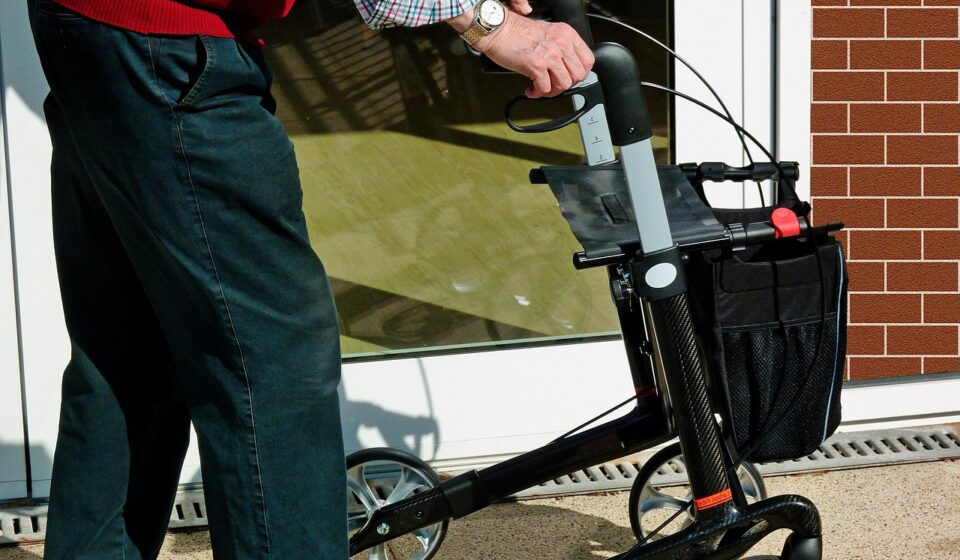
| Mobility equipment | Wheelchairs, walkers, crutches, canes | Remove dirt, inspect grips, wheels, brakes, screws, rubber tips, and seat materials | Loose fasteners, worn tips, or weak brakes can become fall hazards |
| Powered home devices | Oxygen concentrators, infusion-related equipment, home beds | Check filters, cords, alarms, vents, backup power, and supplier service needs | Do not open housings or modify settings unless specifically trained and authorized |
More cleaning is not always safer. Overuse of strong disinfectants can cloud screens, weaken plastics, erase labels, corrode contacts, or leave residues on patient-contact parts. If a device still looks dirty after the approved process, or if bodily fluids entered a housing, tubing pathway, port, or motor area, stop using it until a qualified source confirms the next step.
Manage power, batteries, filters, water, and storage conditions
Many home medical devices depend on stable power and clean airflow. Others need safe water, dry storage, or protection from heat. The FDA has highlighted home-specific issues such as electricity, water, layout, travel, alarms, and backup planning because a home environment is less controlled than a clinic or hospital. A device placed near a window, kitchen counter, humid bathroom, pet bed, or dusty floor may face risks that are not obvious during normal use.
Power and batteries
For battery-powered equipment, keep a simple charging routine and avoid charging habits that create heat or reliability problems. Use the charger, cable, battery type, and outlet arrangement recommended by the manufacturer. Place charging devices on a firm, dry, ventilated surface rather than under bedding, towels, or cushions. Replace batteries when the manual says to do so or when performance clearly declines. If a battery swells, leaks, overheats, smells unusual, or will not hold a charge, stop using it and contact the supplier or manufacturer.
For devices that must run continuously or during sleep, a backup plan is part of maintenance. That may include charged backup batteries, emergency contact numbers, a plan for power outages, and clear instructions for caregivers. Never assume a household power strip, extension cord, or portable power station is suitable for a medical device unless the device instructions or supplier confirm it.
Filters, vents, and airflow
Filters and vents are easy to miss because they may not affect the device until performance has already declined. Dust buildup can restrict airflow, make motors work harder, affect cooling, and trigger alarms. Oxygen concentrators, CPAP units, nebulizer compressors, suction equipment, and some air-handling devices may have intake filters, bacterial filters, or replaceable accessories. Check the manual for the exact part, cleaning method, replacement frequency, and whether a filter is washable or single-use.
Water, humidity, and temperature
Some home devices use water during operation, cleaning, humidification, or maintenance. Use the water type required by the instructions, and empty, rinse, dry, or replace containers as directed. Store equipment away from excess humidity, direct sunlight, heaters, open flames, and areas where children or pets may pull cords or tubing. Heat can affect batteries and adhesives. Moisture can affect electronics and microbial growth. Dust can affect sensors and air pathways.
Use a simple schedule for preventive maintenance
A written schedule keeps maintenance from becoming guesswork. It is especially useful when more than one caregiver is involved, when a patient uses several devices, or when some tasks happen daily and others happen monthly or only after a certain number of uses. Keep the schedule near the device or in a shared notebook. For connected devices, also note app alerts, software messages, or supplier reminders.
| Timing | What to check | Why it matters |
|---|---|---|
| Before each use | Correct assembly, visible damage, clean patient-contact parts, adequate battery or power, clear tubing or openings | Finds obvious problems before they affect therapy, monitoring, or mobility |
| After each use | Cleaning steps, drying, safe storage, disposal of single-use parts when required | Reduces residue, contamination, and misplaced accessories |
| Daily or weekly | Wipe external surfaces, inspect cords, wheels, brakes, cushions, filters, masks, cuffs, and alarms | Catches wear, dirt buildup, and loose components early |
| Monthly or as directed | Replace filters or accessories, check backup batteries, review emergency numbers, confirm supplier service dates | Supports reliability and avoids missed replacement intervals |
| After illness, spills, travel, or storage | Repeat cleaning, inspect for moisture or damage, verify settings, and test operation if the instructions allow | Handles higher-risk situations outside the normal routine |
Records do not need to be complicated. A useful log can include the date, device name, task completed, replacement part lot or model if relevant, alarms observed, and the person who performed the task. For prescribed equipment, keep supplier service paperwork and clinician instructions in the same folder as the device manual. This makes troubleshooting faster when something changes. See also: clinical equipment.
Know when to stop, document, and call for help
Maintenance also means recognizing when a device should not be used. Stop and seek guidance if the device gives repeated alarms, shows unexplained error messages, has a cracked housing, gets wet internally, overheats, produces unusual noise or smell, delivers inconsistent readings, or has missing parts. For mobility equipment, stop using it if brakes fail, wheels wobble, fasteners loosen, rubber tips wear through, frames bend, or weight-bearing parts feel unstable.
Do not silence alarms without understanding them. The FDA’s home device checklist specifically calls attention to knowing what alarms and error messages mean. An alarm can indicate a blocked tube, low battery, power interruption, high temperature, empty reservoir, flow issue, sensor problem, or maintenance requirement. Write down the exact message, time, what the device was doing, and what changed in the home environment. That information is more useful than a general statement such as “it stopped working.”
Call the supplier, clinician, or manufacturer when the instructions are unclear, when the device affects breathing or medication delivery, when a prescribed setting may have changed, or when maintenance requires tools, calibration, internal parts, software access, or electrical repair. Do not modify connectors, bypass alarms, tape damaged cords, reuse single-use accessories, or substitute parts because they appear to fit. A compatible-looking part may change flow, pressure, measurement accuracy, sterility, or electrical safety.
Build maintenance into daily home safety
Medical equipment is part of the home environment, so safe placement is a maintenance decision. Keep cords and tubing routed to reduce tripping. Keep devices away from sinks, bathtubs, cooking areas, cluttered floors, and unstable furniture. Make sure vents are not blocked by curtains, bedding, or walls. Label storage bins for clean parts and used parts. Keep small accessories away from children and pets. Store instructions, emergency contacts, replacement schedules, and warranty or supplier information in one place.
Travel and temporary relocation require extra planning. Before taking equipment to work, school, a relative’s home, or a hotel, confirm power needs, charging access, water requirements, cleaning supplies, storage space, and backup contacts. Pack enough approved accessories, and do not rely on unfamiliar cleaners or replacement parts at the destination. If the device is life-supporting or essential for therapy, ask the supplier or clinician what backup plan is appropriate before travel.
The practical takeaway is simple: safe maintenance is consistent, documented, and device-specific. Clean what the instructions say to clean, replace what the schedule says to replace, keep power and backup supplies ready, protect the device from moisture and heat, and ask for help before improvising.
Frequently asked questions
How often should home medical equipment be cleaned?
Follow the manufacturer’s instructions first. Patient-contact parts may need cleaning after each use, while exterior housings, wheels, handles, filters, or storage areas may follow daily, weekly, monthly, or use-based schedules. If the user has an infection, the device is visibly soiled, or the equipment was shared, ask a clinician or supplier whether extra steps are needed.
Can alcohol wipes be used on every medical device?
No. Alcohol may be acceptable for some surfaces but harmful to others, including certain plastics, coatings, adhesives, displays, probes, and sensors. Use only the disinfectants approved in the instructions. If the manual does not mention alcohol, do not assume it is safe.
What maintenance records should caregivers keep?
At minimum, record cleaning dates, filter and battery changes, replacement parts, alarms, errors, repairs, supplier calls, and unusual performance changes. These notes help identify patterns and make support calls more effective.
When should a home user call the supplier instead of fixing the device?
Call for help when the device has repeated alarms, electrical problems, suspected internal moisture, broken parts, unclear instructions, inaccurate readings, or servicing tasks that require tools or calibration. Call immediately for devices linked to breathing support, medication delivery, or prescribed therapy settings.
Is preventive maintenance the same for all home medical equipment?
No. Preventive maintenance depends on device design, patient-contact risk, power needs, accessories, and manufacturer labeling. A walker, CPAP machine, glucose meter, oxygen concentrator, and thermometer all need different routines. A single general checklist can help organize care, but it should never replace device-specific instructions.